



What is One Click Trading?
Last updated: 12 August 2026
One Click Trading is a feature for experienced traders who want to trade instantly, without additional confirmation steps.
One Click Trading enables you to open and close your trades faster, with only one click. By activating this feature, you can pre-define the parameters you would like to use on your trades, such as the amount, leverage, Stop Loss and Take Profit.
This feature is not currently available in the etoro AI app. If you are using etoro AI, please use the etoro app or the web version of etoro for this action.
One Click Trading will only work for the markets you’ve selected.
It can be especially useful during times of high volatility, allowing you to react quickly to market movements.
Before using One Click Trading, ensure you thoroughly understand its functionality and the risks involved. It should be used with caution, as no confirmation is requested when opening or closing a trade.
To activate One Click Trading:
- Go to Settings > Trading.
- Switch on One Click Trading.
- Use the search bar to find the asset you want to enable One Click Trading for and select it.
- Your selected asset will appear below in a list. Press the three dots
 next to the asset, then Edit to set your trade parameters.
 - Choose your preferred parameters: amount, leverage, Stop Loss and Take Profit.
- Click Save Settings.
The Stop Loss and Take Profit can be set to ‘Default’, which is currently the platform default of 50%, or ‘Max’, which sets the maximum allowable value for each (currently 50% for Stop Loss and 1000% for Take Profit).
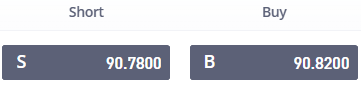
On the Watchlist and Portfolio, the prices for the markets you’ve set up for One Click Trading are now highlighted in grey.
You can now place orders to open buy or short positions with just a single click, using your predefined trade parameters.
To open trades with one click:
- Go to your Watchlist, Portfolio, or the chart of an asset that you’ve set up for One Click Trading.
- Click the buy price (marked B)to open a buy position, or the sell price (marked S)to open a short position.
- An order will be placed instantly using your preset parameters during trading hours.
Closing trades with one click
When One Click Trading is enabled on an asset, clicking Close on any positions on that asset creates an order to close the position, without taking you to the Close Trade screen to review and confirm the closure.
If the market is open, the close order is executed immediately. If the market is closed, the close order will be executed when the market opens, and can be cancelled until then.
Disabling or editing One Click Trading
You can disable One Click Trading from the Settings > Trading menu at any time. You can also edit or remove assets from your One Click Trading list whenever needed, ensuring your trading setup always suits your preferences.
Was this article helpful?
Still need help?
We're happy to assist you, whenever you need us. Choose your preferred method of contact.